UDIN Verification is now Easier! Now you can verify UDIN in Bulk and Save Time, Know How


ICAI has made UDIN verification much easier. It has introduced a new feature for UDIN verification that allows users to verify UDIN numbers in bulk. Now, users can verify up to 10 UDIN numbers at a time. Earlier, users had to verify UDIN numbers one by one. For example, earlier only one UDIN could be verified at a time, and users had to click “verify another UDIN,” enter the details again, and then complete the verification. With the new feature, users need to enter the details only once and can verify 10 UDIN numbers at the same time. This makes the process faster and saves a lot of time.
Also Read: RBI creates New Rules for Branch Openings by NBFCs, Let’s Understand!!
In this article, we will have a look at the complete process of bulk UDIN verification:
How to Verify UDIN?
Step 1: Visit the official website – https://udin.icai.org/ICAI and click on Verify UDIN on Top Right corner below UDIN logo.

Step 2: Enter details such as name, mobile number, email and organisation type and click on bulk verify if you want to verify more than 1 UDIN.
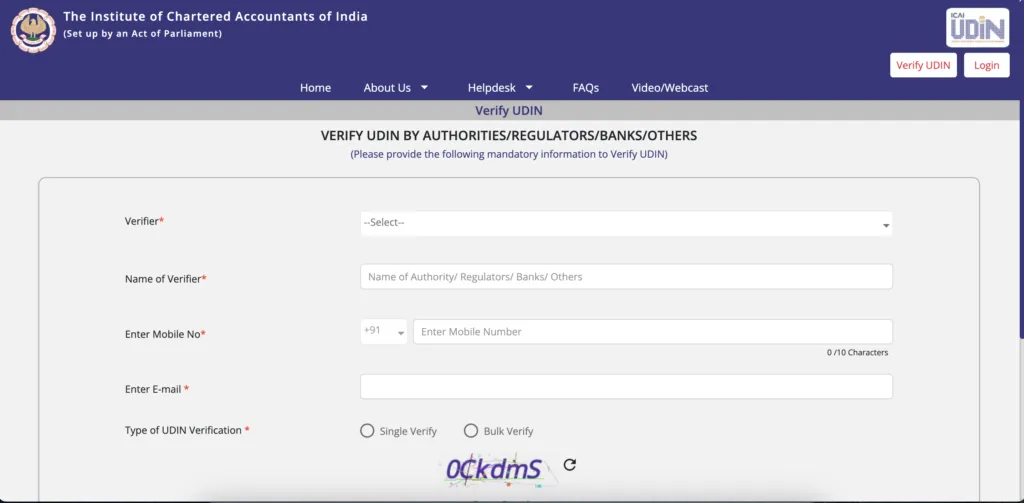
Step 3: Enter the UDIN numbers in bulk, enter captcha and submit OTPs received on email and mobile number.
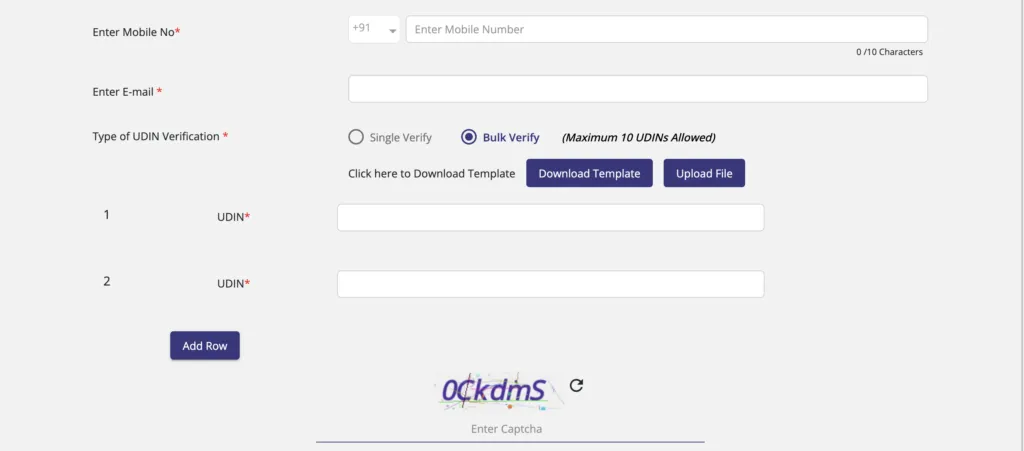
That’s it. All the UDIN numbers will be verified altogether and you can take our printout also very easily. For example: If you have verified 5 UDIN numbers, then you can print all 5 UDIN numbers altogether. This save a lot of time.
Also Read: Fight erupts between HDFC Bank Female Employee and Customer in Kanpur